Organized IT support, hosted on your infrastructure.
Baseline Help Desk is a self-hosted IT support portal for employees and IT teams. Ticket creation, assignment, SLA tracking, knowledge base, service announcements and role-based dashboards — no third-party cloud required.
Request a Demo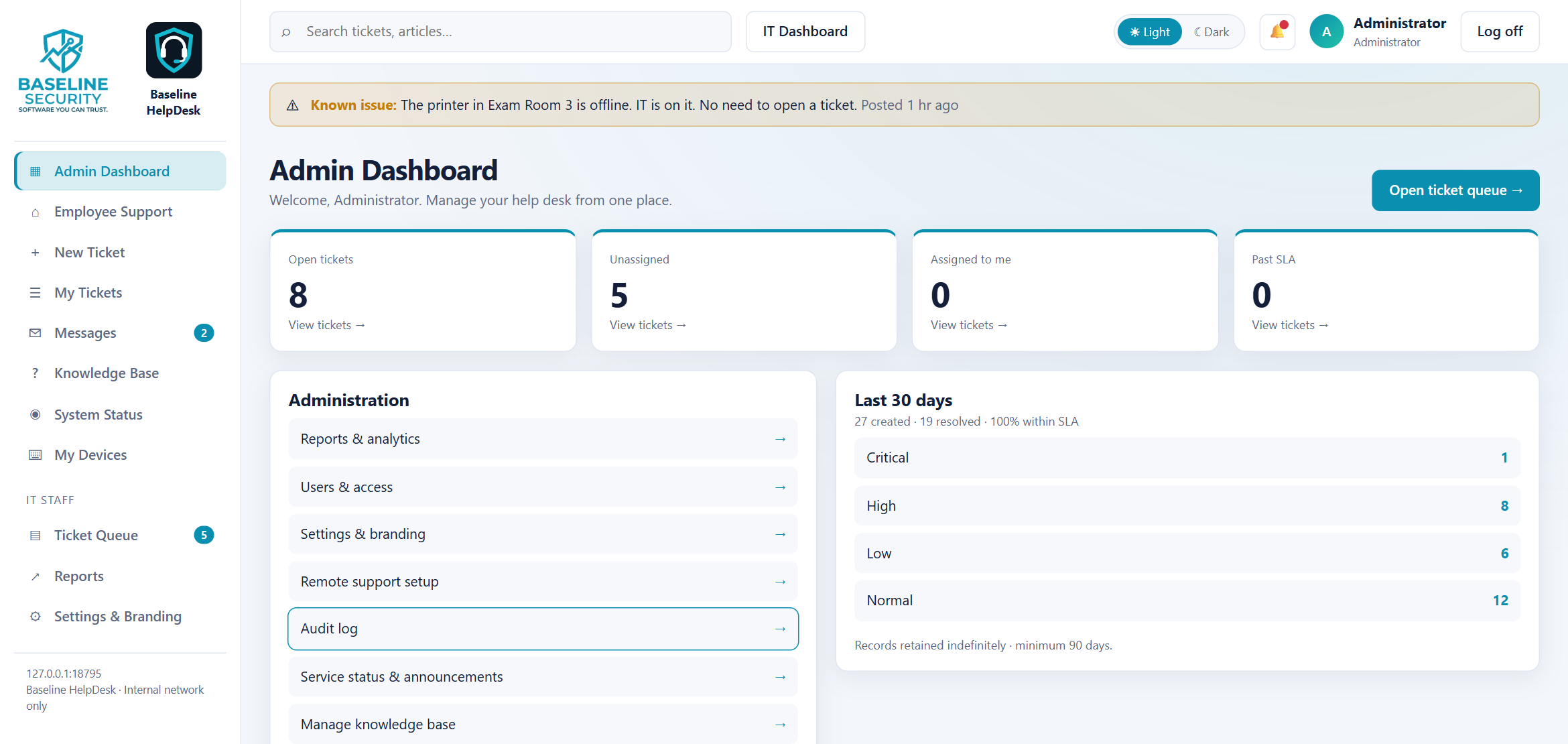
A complete support portal for your organization.
Employees access Baseline Help Desk through a browser. They create tickets with category, affected device, urgency and optional attachments, then track status, assigned technician and response targets. IT staff manage a shared queue with assignment, priority and status changes, internal notes, canned replies and overdue tracking. Administrators see dashboards, reporting and full audit records.
Employee experience
Ticket creation
Employees submit tickets with category, affected device, urgency level and optional file attachments.
Status tracking
Employees see their ticket status, assigned technician, response targets and the full conversation thread.
Knowledge base
Self-service articles help employees resolve common issues before opening a ticket.
Service announcements
IT posts known issues and planned maintenance so employees know what is already being worked on.
IT staff tools
Shared ticket queue
Staff see all open tickets with assignment, priority, status and overdue indicators. Filter by status, priority, category or assigned technician, and order by service target or priority.
Internal notes and canned replies
Add private notes visible only to staff, or use canned replies to respond consistently and quickly.
SLA and service-target tracking
Response and resolution targets are tracked per ticket. Overdue tickets are surfaced automatically.
Assignment and priorities
Assign tickets to specific technicians, change priority and status, and review recorded history of all changes.
Administration and reporting
Dashboard
Open tickets, unassigned count, SLA performance and priority breakdowns at a glance.
Period reporting
Volume, response and resolution metrics with period filters. Export to CSV or print.
Role-based access
Separate employee, technician and administrator roles with appropriate permissions for each.
Audit records
All ticket actions, status changes and administrative operations are logged for accountability.
Product walkthrough
Baseline Help Desk walkthrough — fictional clinic example of the general-purpose product.
Optional capabilities
AI self-service assistance
When configured with a compatible provider, Baseline Help Desk can offer employees AI-assisted self-service troubleshooting based on published knowledge-base articles and recorded fixes. If the issue is not resolved, the conversation hands off to a human ticket with the context preserved. The core ticketing portal works fully without AI. No specific AI model or provider is included — configuration requires a compatible provider and appropriate credentials.
Attended remote support
IT staff can invite employees to an attended remote-support session through a customer's eligible Splashtop subscription. This requires separate Splashtop setup and licensing. Requester consent and provider permissions are required. Unattended remote access is not provided, and no Splashtop license is included with Baseline Help Desk.
Frequently asked questions
Is Baseline Help Desk cloud-hosted or self-hosted?
Self-hosted. Baseline Help Desk runs on your own infrastructure. You control the data, the server and the network access. For production use, appropriate HTTPS and network security configuration is required.
How long are records retained?
Records are retained indefinitely in the current build. Customers should plan storage capacity accordingly and maintain full data-folder backups as part of their operational procedures.
Does it include a Splashtop license?
No. The optional attended remote-support feature requires a customer's own eligible Splashtop subscription with separate setup and licensing. Baseline Help Desk provides the invitation workflow; the remote session is handled by Splashtop under their terms.
Is AI assistance included?
The core support portal works fully without AI. Optional AI self-service assistance can be configured with a compatible provider to help employees troubleshoot using knowledge-base content, with handoff to a human ticket if unresolved. No specific model or provider is included or promised.
Who is it designed for?
Baseline Help Desk is designed for any organization that wants a structured IT support portal hosted on its own infrastructure. It suits small and mid-sized businesses, clinics, law firms, credit unions and any team where employees need a reliable way to submit and track IT issues.
Bring structure to your IT support.
Request a demo to see Baseline Help Desk's ticket workflow, staff queue and reporting.
Request a Demo