Employee Training
Help employees recognize and report everyday threats.
Baseline Security Awareness Training is a self-hosted, browser-based platform for administrator-managed employee cybersecurity training. Five structured modules, five-question quizzes, enrollment cycles with due dates, and detailed reporting — all on your own infrastructure.
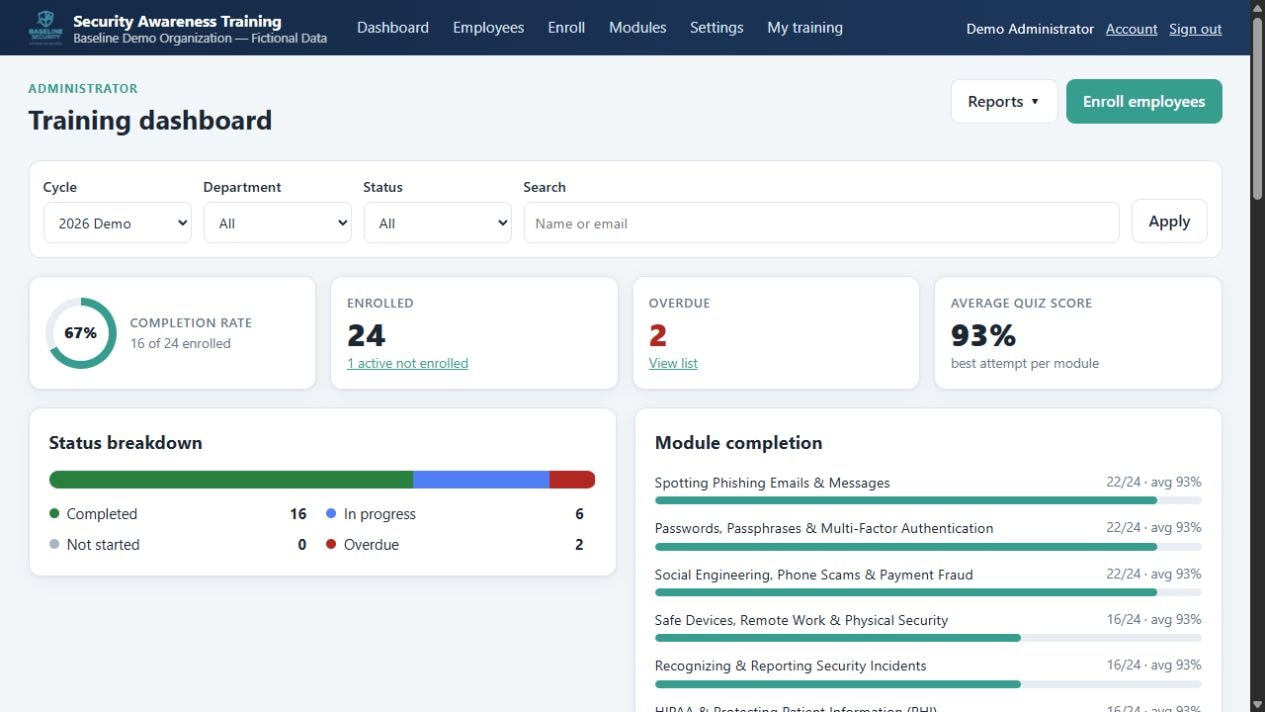
Actual application — fictional demonstration data
Training content
Five core modules.
Each module covers a distinct area of everyday cybersecurity awareness, followed by a five-question quiz to reinforce the material.
Spotting Phishing Emails & Messages
Teaches employees to recognize suspicious sender addresses, deceptive links, urgency tactics and credential-harvesting attempts across email and messaging channels.
Passwords, Passphrases & MFA
Covers strong password and passphrase construction, the role of multi-factor authentication, and safe credential habits — including what not to share and where not to reuse.
Social Engineering, Phone Scams & Payment Fraud
Addresses pretexting, impersonation, vishing and payment-redirect fraud — helping employees recognize manipulation attempts before acting on them.
Safe Devices, Remote Work & Physical Security
Covers safe device habits, remote-work considerations, screen locking, physical access awareness and the risks of unattended or shared workstations.
Recognizing & Reporting Security Incidents
Helps employees identify signs of a potential incident — unusual account activity, unexpected software, suspicious requests — and understand how and when to report concerns.
HIPAA & Protecting Patient Information
An optional sixth module for healthcare organizations covering patient data handling, PHI awareness and safe information practices. Supports healthcare training topics alongside the five core modules.
Quizzes & progress
Reinforce learning. Track quiz attempts and results.
Each module ends with a five-question quiz. The default pass threshold is 80% and is configurable by the administrator. Retakes are fully tracked — attempt count, best score and most recent score are recorded for every employee and module.
Five questions per module
Short, focused quizzes that reinforce the lesson content without being burdensome.
Configurable pass threshold
Default 80% pass threshold. Administrators can adjust to match their program requirements.
Quiz attempt tracking
Quiz attempts are tracked. Administrators see attempt count, best score and most recent score for each employee and module.
Optional video lessons
Supplied by your organization
The platform supports locally supplied video lesson files. Where video is provided by your organization, employees can watch, pause and resume with progress tracked. The quiz unlocks after the lesson is watched.
Text-based lessons are available for all modules regardless of whether video is supplied. No video files are bundled with the platform.
Watch progress
Progress is saved so employees can resume where they left off.
See it in action
See awareness training in action.
A short guided promo using actual application views and fictional demonstration data. Heart narration and captions are included in the video. Not a continuous screen recording.
Jump to a section
Administrator workflow
Manage training from setup to results.
Administrators control the full training lifecycle — organization setup, employee management, enrollment cycles, and results review.
Set up your organization
Configure your organization name and security reporting contact. Add departments to group employees and filter results by team.
Add employees
Add employees individually or bulk-paste a list. Each employee receives a temporary password and is required to change it at first sign-in.
Create an enrollment cycle
Assign modules to a cycle with a due date. Enroll employees individually or by department. Track completion and follow up on overdue assignments.
Review results and reports
Monitor completion rates, quiz scores and attempt history from the administrator dashboard. Export executive or detailed reports as self-contained HTML, PDF or CSV.
Employee experience
Simple for employees.
Employees sign in to a browser-based training view, work through assigned modules at their own pace and complete quizzes to record their results.
Sign in and see your assignments
Employees sign in to a browser-based training view and see their assigned modules, due dates and completion status at a glance.
Work through lessons
Each module presents lesson content at a comfortable pace. Where video lessons are supplied by the organization, employees can watch, pause and resume with progress tracked.
Complete the quiz
A five-question quiz follows each lesson. The default pass threshold is 80% and is configurable. Quiz attempts are tracked with attempt count, best score and most recent score.
Module marked complete
After passing the quiz, the module is automatically marked complete with a timestamp. Administrators can see completion status, scores and attempt history for every employee and cycle.
Reporting
Results you can act on and share.
The administrator dashboard shows completion rates, quiz scores and follow-up lists filtered by cycle and department. Detailed and executive reports are available for download and sharing.
Administrator dashboard
Completion rates, quiz scores, overdue follow-up lists and per-employee results — filtered by cycle and department.
Executive and detailed reports
Completion charts, quiz score summaries and follow-up lists. Self-contained HTML download, browser print/save PDF and CSV export.
Activity log
Configurable organization and security reporting contact. Activity log records administrative actions for internal review.
Supporting your awareness program
Documented assignments, completion records and quiz results can support an organization's awareness program and internal reviews. The optional HIPAA module supports healthcare training topics.
Baseline Security Awareness Training does not automatically fulfill regulatory training obligations or guarantee compliance with any specific standard or certification.
Employee management
Add employees individually or bulk-paste a list. Deactivating an employee preserves their training history. Departments let you filter results and target enrollment cycles to specific teams.
FAQ
Common questions.
Ready to build a more security-aware team?
Request a demo to see the platform in action, or get in touch to discuss your environment and training goals.