
Baseline Sentinel
Windows workstation security monitoring.
One dashboard. A clearer view of every workstation.
Bring workstation health, security findings, browsing activity, and network visibility together with one Windows agent.
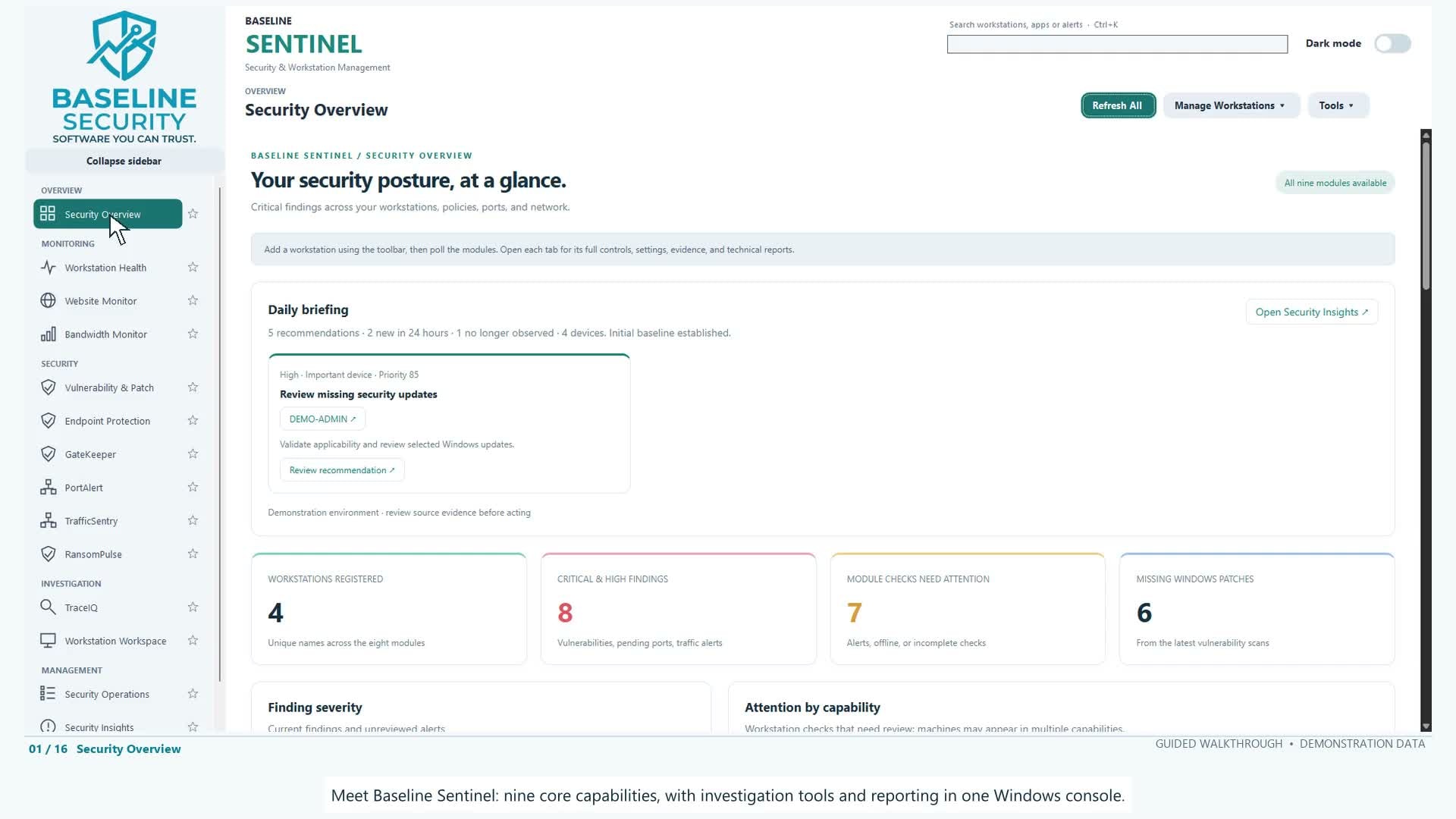
Eight capabilities · One agent · Branded reports
What Baseline Sentinel collects
Each capability is delivered through the same agent. No separate installs, no additional hardware.
Workstation Health
CPU, memory, disk, and temperature readings with configurable threshold alerts.
DetailsWebsite Monitor
Collected browser history from Chrome, Edge, and Firefox across all user profiles.
DetailsVulnerability & Patch
Missing Windows patches by severity, restart status, and evidence — no auto-deployment.
DetailsGateKeeper
Web access policies by category, domain exception, and schedule — enforced at the workstation.
DetailsPortAlert
Listening port inventory, baseline comparison, and change alerts with process association.
DetailsTrafficSentry
Network anomaly detection, beaconing indicators, and threat intelligence cross-reference.
DetailsBandwidth Monitor
Application and user bandwidth by Internet vs. LAN, with rates and coverage across all workstations.
DetailsEndpoint Protection
Read-only visibility into Defender, Firewall, encryption, software inventory, and sign-in status.
DetailsCollect. Prioritize. Investigate.
Baseline Sentinel is built around a simple workflow that works for small teams without a dedicated security analyst.
Collect
The Baseline Sentinel agent collects supported workstation data when polled — health metrics, security findings, browser history, port status, network connections, and bandwidth data from every enrolled workstation.
Prioritize
Findings are scored and surfaced in the priority queue. Severity levels, threshold breaches, and baseline deviations tell you what needs attention first — without requiring you to read through raw logs.
Investigate
Drill into any workstation profile, assign an owner label to findings, add investigation notes, and mark items resolved. The 90-day history gives you context for any finding.
Capabilities walkthrough
A guided walkthrough of the Baseline Sentinel dashboard using demonstration data.
Explore nine core monitoring capabilities, investigation tools and reporting workflows using demonstration data.
Jump to chapter
Readable workstation profiles
Every enrolled workstation has a unified profile that brings together all collected data in one place. Summary cards give you a quick read on health, security posture, and recent activity without navigating between sections.
- Health metrics with threshold status
- Security findings by severity
- Recent browser history snapshot
- Open ports and baseline status
- Bandwidth usage summary
- Endpoint protection status
Workstation
WS-ACCT-04
Illustrative preview — demonstration data
CPU
42%
Memory
78%
Disk
61%
Patches
1 Critical
Recent findings
History, reporting, and workflow
Beyond the nine core capabilities, Baseline Sentinel includes tools for managing findings, tracking changes, and producing reports.
Combined Workstation Profiles
Every enrolled workstation has a unified profile page that brings together health metrics, security findings, browser history, port status, and bandwidth data in one place. Summary cards give you a quick read on each machine without drilling into individual capability views.
Global Search
Search across workstations, findings, alerts, and collected data from a single search bar. Useful when investigating an incident or locating a specific machine or finding without navigating through individual sections.
Observed Changes
Baseline Sentinel tracks changes to workstation configuration and collected data over time. When something changes — a new port opens, a patch status changes, a new application appears — it is recorded and surfaced for review.
Alert Ownership & Resolution
Alerts can be assigned an owner label and annotated with investigation notes, acknowledged, and resolved. This gives small teams a lightweight workflow for tracking what has been looked at and what still needs attention.
Notification Maintenance Windows
Schedule maintenance windows to suppress notifications during planned downtime, patch cycles, or after-hours periods. Findings are still collected; notifications are held until the window closes.
Trends
View metric trends over time for individual workstations or across your fleet. Useful for spotting gradual degradation in health metrics or changes in bandwidth consumption that would not be obvious from a point-in-time snapshot.
90-Day Collection History
Baseline Sentinel retains collected data for 90 days. This gives you a meaningful window for investigation, trend analysis, and reporting without requiring long-term storage infrastructure.
Branded HTML Reports
Generate white, printable branded HTML reports for any workstation or across your fleet. Reports can be produced on demand or scheduled to run monthly while the Windows user is signed in.
Common questions
Does ongoing collection require the dashboard to be open?
Yes. The Baseline Sentinel agent collects supported workstation data when polled by the dashboard. The dashboard must remain open for collection to be processed and stored. Closing the dashboard pauses data ingestion; reopening it resumes collection from that point forward.
Can scheduled reports run while I am signed in?
Yes. Scheduled monthly reports can run while the Windows user is signed in, even when the Baseline Sentinel dashboard is closed. Ongoing collection and archiving require the dashboard to remain open.
Does availability vary by workstation?
Yes. Some capabilities depend on OS version, installed software, user permissions, and audit settings on each workstation. Temperature readings are available where hardware sensors support them. Browser history collection requires the supported browsers to be installed. The dashboard indicates where data is unavailable for a specific workstation.
Does Endpoint Protection replace antivirus software?
No. Endpoint Protection is read-only visibility — it reads and displays the status of Windows Defender and other installed security software. It does not replace antivirus, modify security settings, or guarantee protection against any specific threat.
What does RansomPulse do?
RansomPulse monitors enrolled workstations for behavioral indicators associated with ransomware activity and surfaces findings with supporting evidence for administrator review. It is an early-warning tool — it does not guarantee detection of every ransomware variant or prevent an attack from completing. Findings require administrator review before any action is taken. RansomPulse is a capability within Baseline Sentinel, not a separate product.
Does Vulnerability & Patch automatically deploy patches?
Vulnerability & Patch surfaces missing patches and their severity so you can prioritize remediation. Supported Windows Updates can be individually approved by an administrator after evidence review, with post-action verification. There is no automatic patch deployment. Third-party application upgrades follow vendor-supported channels.
Ready to see Baseline Sentinel in action?
Contact us to request a demo or ask about pricing for your environment.