Ransomware readiness, evidence review and file recovery.
Baseline Rewind monitors Windows workstations for ransomware indicators, maintains a central versioned vault on the management server and gives administrators the tools to review evidence, recover files and coordinate a fleet response.
Request a Demo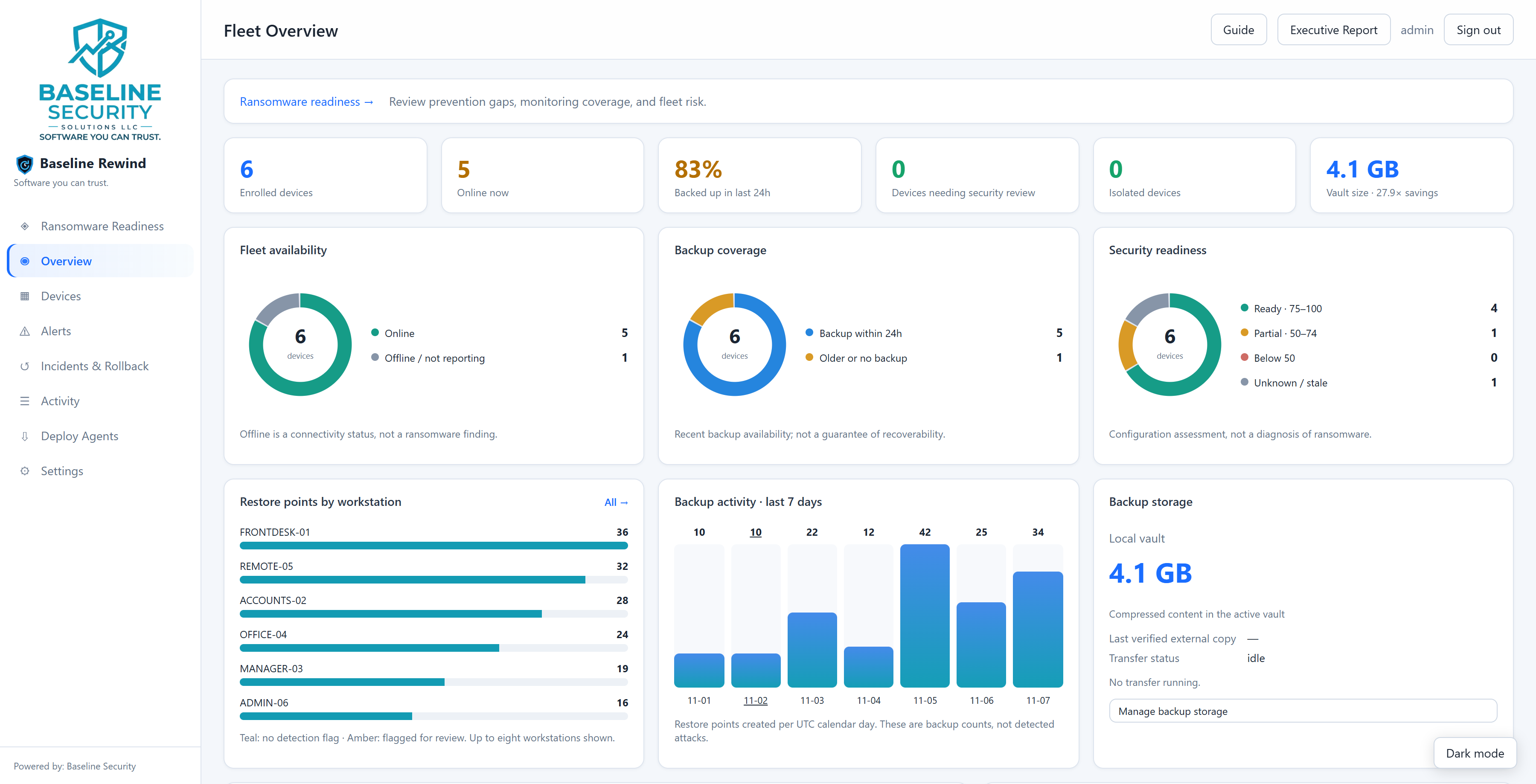
One application. Readiness, detection and recovery.
Baseline Rewind runs on Windows workstations and reports to a central management server. The Fleet Overview dashboard shows enrolled devices, backup coverage, readiness scores and restore-point activity. When a potential ransomware event is observed, administrators review the recorded evidence and decide to confirm or mark it as a false positive. Confirmed events record an administrator decision; the administrator then chooses containment and recovery actions under configured policy.
Fleet overview and readiness
Availability and backup coverage
See which workstations are online, which have recent backups and which need attention — at a glance across the fleet.
Security readiness scores
Readiness is assessed per workstation based on configuration and backup status. Scores are categorized as Ready, Partial, Below 50 or Unknown.
Restore points by workstation
A bar chart shows restore-point counts per workstation so administrators can quickly identify gaps in coverage.
Seven-day backup activity
A daily chart of restore points created across the fleet over the past seven days. These are backup counts, not detected attacks.
Evidence review and recovery
Evidence review
When a potential event is observed, administrators review the precise recorded evidence and reasons before taking action. Unconfirmed observations are not presented as confirmed ransomware.
Confirm or false positive
Administrators confirm ransomware or mark an observation as a false positive. Confirming records an administrator decision; the administrator then chooses containment and recovery actions under configured policy.
Recovery preview and browse
Browse the protected file timeline, preview file versions and compare changes before committing a restore. Recover selected files or folders to their state at any recorded restore point, or restore to an alternate folder to review before overwriting.
Quarantine and test restores
Administrators can quarantine current file versions and run alternate-folder restore exercises to verify recovery without overwriting live files. Administrator-directed isolation and pause of operations are available as separate actions under configured policy. Test restores to an alternate folder let administrators verify recovery before committing any changes to live files.
Fleet incident plans
Coordinate a response across multiple workstations with fleet-level incident management tools and operation history.
Reports and operation history
Review a full log of backup operations, recovery actions and administrator decisions. Suitable for internal incident documentation.
Watch Baseline Rewind in action.
Explore readiness, evidence review and file recovery using demonstration data.
Flexible storage configuration
Local vault
The active backup vault is stored on the Rewind management server's local storage.
Local vault with verified external copy
The vault is maintained on the management server and a verified copy is transferred to a dedicated external server or NAS destination for additional resilience.
External primary vault with verified migration
The active backup vault is migrated to an external server. Migration is verified before switching the active vault. The retained local source copy is optional administrator cleanup after verification — it is not removed automatically. The active database remains on the management server.
Deployment and recovery planning.
Baseline Rewind protects selected files and folders, not a full Windows system image. Operating system recovery requires separate imaging tools.
The monitoring service runs in the background independently of the visible application window.
Rewind does not guarantee prevention of ransomware. It provides readiness monitoring, evidence review and recovery capability.
Configurable retention and free-space reserves allow administrators to balance coverage depth against storage capacity.
Network security, appropriate access controls and HTTPS configuration are required for production deployment.
Explore Rewind for your industry
One-page overviews for common deployment contexts.
Frequently asked questions
Does Baseline Rewind prevent ransomware?
Baseline Rewind does not guarantee prevention. It monitors workstations for ransomware indicators, maintains a versioned vault of protected files and gives administrators the tools to review evidence and recover. Prevention depends on the broader security environment.
What files does it protect?
Rewind protects selected files and folders configured by the administrator. It is not a full Windows image backup — operating system recovery requires separate imaging tools.
What happens when a potential event is detected?
Rewind records the evidence and surfaces it for administrator review. The administrator reviews the precise recorded evidence and decides to confirm ransomware or mark it as a false positive. Confirming records an administrator decision; the administrator then chooses containment and recovery actions under configured policy.
Where is the vault stored?
Administrators choose from three storage configurations: local vault on the management server, local vault with a verified external copy to a server or NAS, or an external primary vault with verified migration. The active database always remains on the management server.
Can I test a recovery before overwriting files?
Yes. Rewind supports recovery preview and alternate-folder restore. You can browse file versions, preview changes and restore selected files to an alternate folder to verify the result before overwriting any live files.
Build a stronger recovery plan.
Request a demo to see Baseline Rewind's readiness dashboard, evidence review and file recovery workflow.
Request a Demo